


What goes on a pizza menu
- 1Two sizes, typed once
- Pizza is sold by size. Under All options, tick "Two prices on each line, like Small and Large" and name the two prices as you sell them: Medium and Large, Small and Large, or the widths in centimetres. Every pizza then has two price boxes side by side.
- 2Classics, then the loaded ones
- Group the pizzas: a Classics section for margherita, Regina, Hawaiian and pepperoni, then a section for the meaty and chicken ones, then anything of your own. Within a section, go from the plainest to the most loaded, so the prices climb down the list.
- 3Toppings in the name
- A pizza with a name of its own needs its toppings said. Put them in brackets after the name, such as "Regina (ham and mushroom)". Three or four words are enough. A name everybody knows, like Hawaiian, needs none.
- 4Extra toppings and a base
- Give add-ons a short section: an extra topping, extra cheese, a gluten-free base if you make one. One price each. Name the section "Add" so it reads as a continuation of the pizzas above it.
- 5The two-pizza deal
- Two large pizzas at one price is a deal many pizza places run. On the menu, a line in the box for where you are and when you are open can mention it. For a poster of the deal itself, open All options and choose Specials at the top: the price box takes a deal in your own words as well as an amount.
- 6Delivery and collection
- Say in the same box whether you deliver and how far, in a few words. Add your phone number and tick "This number is on WhatsApp" if orders come in that way. Both are drawn at the foot of the menu.
- 7A photo from above
- Shoot one whole pizza from straight above, in daylight, on a board or its box, and fill the frame with it. One slice lifted shows the cheese. The maker frames one photo under your name.
- 8For the box and the window
- Print the A5 picture to slip into each box, and the A4 one for the window. The tall shape is the one for Status, where a new price is one tap away.
Pizza menu design ideas
Six ways one pizza menu can look, dark and loud or pale and quiet. Tap a picture to start from it, then type your own pizzas over the example.
- Pizza night look, tall shape
- Pizza night is dark, with a strip of red check cloth along the top and foot and the prices in yellow. The independent pizza posters this look was drawn from were dark with one loud colour, not a whole checked page.
- Slate in black and yellow, tall shape
- Slate is flat black with yellow labels and nothing else, the way a Pizza Friday post is often made. It is the plainest of the dark looks and holds a long list of pizzas.
- Green chalkboard, square, the first nine items
- A green chalkboard on a square, for a post. Chalk lettering suits a pizza place with a board on the pavement. A square is short, so only the first nine items are drawn here: the pizzas and the extras.
- Pizza night look in brick red, A4 to print
- The same look on a brick red ground, set for an A4 print for the window. The check cloth strips stay; only the ground and the price colour change.
- Pizza night look in basil green, square, the first nine items
- Dark basil green with cream prices is the calm one of the three colour sets. On a square the first nine items sit in two columns; the sides are left for the tall shape or a print.
- Cream card, the Sunday lunch look in green, A5 to print
- A cream card with a green frame is the sit-down version: serif names and a thin line under each. At A5 it is a table menu.
A pizza menu, step by step
The example has four sections. Classics and Loaded each have two prices on a line, Medium and Large, with seven pizzas between them. "Add" has an extra topping and extra cheese. Sides has garlic bread, six wings and a cold drink with its size in the name. The foot of the menu mentions the Friday deal and delivery.
Tips
- Name the two sizes the same way in every section, so the columns line up down the page.
- Give the size in centimetres in the column name if customers ask how big a large is.
- Keep toppings in brackets to four words or fewer.
- List the cold drink with its size: 440ml, 1.25L or 2L.
- Make the deal its own poster for the day it runs, and leave the menu as the menu.
Sizes and printing
- Tall, for WhatsApp Status
- Tall like a phone screen. Best for WhatsApp Status and for Stories.
- Square, for a post
- Square. Best for a post on Facebook or Instagram.
- Printer page (A4)
- A4 is the size of a normal printer page. Print it at home or at a print shop. A home printer leaves a thin white edge.
- Half page (A5)
- A5 is half of a normal printer page. Good for a counter. A home printer leaves a thin white edge.
Questions
- Can I show small, medium and large on one line?
- No, a line holds two prices. Show the two sizes you sell most as the columns, and add the third as a section of its own or as extra lines, with the size in each name.
- Can the price be "2 for" a set amount?
- Yes. A price box takes a deal in your own words as well as an amount. A deal that covers the whole list, such as any two large classics, fits better in the line at the foot of the menu or on a poster of its own.
- Where do the toppings go?
- In brackets after the name of the pizza. The form has no separate description line, so keep the list short.
- Can I make a half-and-half or build-your-own section?
- Under All options you can add a section with a line such as "Half and half, any two classics" and a price. The maker draws the words and the price you type; it does not work a price out for you.
What you type is kept in this browser on this device until you clear your browser data, so you can come back, change a price and save a new picture. A photo and a logo are optional and are not kept for the next visit.
Closest to this one
 Burger menu
Burgers from the same kitchen get their own list, with the add-ons in a section.
 Pub specials poster
A pizza night in a pub week sits on the pub poster beside the other days.
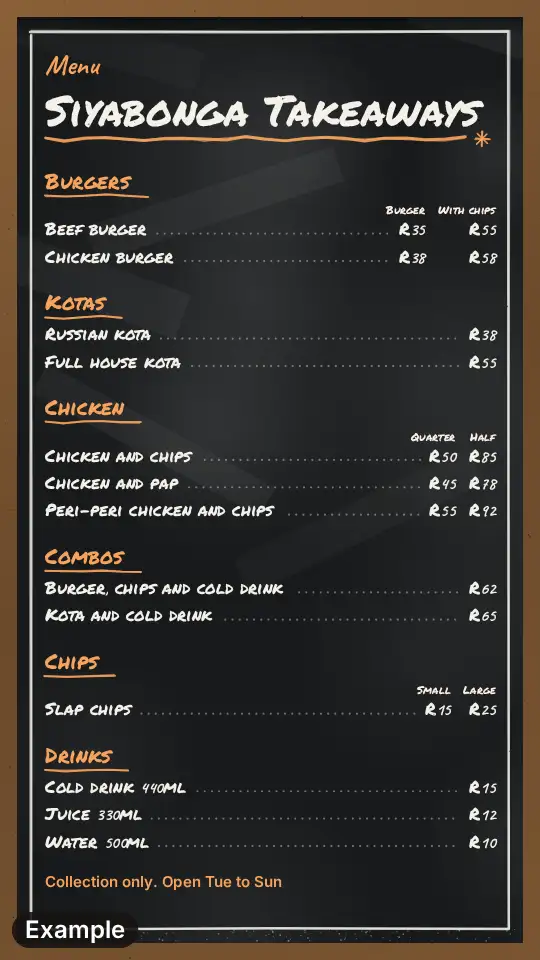 Takeaway menu
Pizza as one section among wraps, chicken and chips fits the takeaway menu.
 Food truck menu
A wood-fired oven on a trailer needs the short truck board and its where-and-when strip.