


What goes on a burger menu
- 1Burgers first, in the order you grill them
- A burger menu reads in this order: burgers, then what can be added, then sides, then shakes and drinks, then anything for children. Beef usually leads, then chicken, then a veggie or fish patty. The picture keeps the order you type.
- 2Single and double on one line
- Most burger bars sell every burger as a single or a double patty. Under All options, tick "Two prices on each line, like Small and Large" for the Burgers section and name the two prices Single and Double. Each burger then has two price boxes and the names stand above the columns.
- 3Say the weight if you sell by it
- If your patty is 100g, 150g or 200g, put it in the name: "Classic beef burger, 150g". The same goes for "with chips" when chips come on the plate. Nobody at the counter then has to ask what the price covers.
- 4Add-ons in their own section
- Bacon, cheese, an egg, a second patty, chips on the side: give them a section called "Add to any burger" with one price each. It keeps the burger names short and shows what an extra costs before the order is placed.
- 5What is in each burger
- The form has a name and a price for each line, and no separate line for a description. Put what is in the burger in brackets after its name, such as "Cheeseburger (cheddar, pickles, sauce)", and keep it to a few words so the line does not wrap twice.
- 6The weekday burger special
- Burger places often name a day: Burger Monday, or any two burgers at one price on a Friday. For that poster, open All options and choose Specials at the top, type the offer as one special, press Change the days and tap the day. On the menu itself, the box for where you are and when you are open can carry one short line about it.
- 7A photo of one burger
- One burger, cut side or front on, in daylight, on a plain board or paper, fills the frame better than a table of food. The maker has room for one photo, set in a frame under your name. On a square, or with more than twenty items, the menu is drawn without it.
- 8Where the menu goes
- The tall shape is for WhatsApp Status. Print the A4 page for the wall behind the counter or the window, and A5 for each table. A long menu prints better as two pictures, burgers on one and sides and drinks on the other.
Burger menu design ideas
Six ways one burger menu can look, from the pictures above. Each is drawn from how burger places here really post their boards and specials. Tap one to start from it.
- Burger bar look, tall shape
- Burger bar is black and mustard with a row of checks along the top and foot. Section names sit on rounded tabs and the two price columns, Single and Double, are in the mustard colour, so the eye lands on the numbers.
- Menu board in black and orange, A4 to print
- Menu board is the black board behind a counter: a double line round the edge, the name in the middle, section names over a rule. In black and orange it has a small flame under the name. Printed on A4 it goes above the till.
- Chalkboard, tall shape
- Chalkboard suits a burger bar that writes its board by hand. A thin chalk line runs under each burger, with its two prices on the right, and the section names are underlined in coloured chalk.
- Burger bar look in red and yellow, square
- The same look on a red ground with yellow tabs and prices, the colours of a roadhouse tray. A square holds this whole menu in two columns, for a post.
- Slate in black and yellow, A5 to print
- Slate is flat black with tilted yellow labels: the plain way many independent burger places post a special. A5 is half a printer page, the size for a table or the counter.
- Kasi look in charcoal, A4 to print
- Kasi in charcoal sets white names and pale yellow prices on a near-black ground, with tilted white tabs. It is a look to try when the menu is long.
A burger menu, step by step
The first picture comes from four sections. Burgers has five lines with two prices each, named Single and Double. "Add to any burger" has chips, bacon and extra cheese. Sides has onion rings, large chips and four wings, with the count in brackets. Drinks has a milkshake and a cold drink with its size in the name. The line at the foot says which day the two-burger special runs.
Tips
- Write "burger and chips" only when chips really come with it; otherwise list chips as an add-on.
- Keep the burger names to two or three words and let the brackets carry the fillings.
- If only some burgers come as a double, leave the second price box empty on the others.
- Count pieces in the name: "Wings (4)", "Onion rings (6)".
- When the Monday special ends, take its line off the foot of the menu and save a new picture.
Sizes and printing
- Tall, for WhatsApp Status
- Tall like a phone screen. Best for WhatsApp Status and for Stories.
- Square, for a post
- Square. Best for a post on Facebook or Instagram.
- Printer page (A4)
- A4 is the size of a normal printer page. Print it at home or at a print shop. A home printer leaves a thin white edge.
- Half page (A5)
- A5 is half of a normal printer page. Good for a counter. A home printer leaves a thin white edge.
Questions
- Can I show a single and a double price for each burger?
- Yes. Under All options, tick "Two prices on each line, like Small and Large" for that section and name the two prices Single and Double. A burger with only one size keeps its second box empty.
- Can I list three sizes of burger or chips?
- Not on one line. A line holds two prices. For a third size, add a line of its own, for example "Chips, family size", with its price.
- Can I make a Burger Monday poster instead of a menu?
- Yes. Open All options and choose Specials at the top, type the offer and its price as one special, press Change the days and tap Monday. The poster says the day in words.
- Where do the toppings of each burger go?
- In brackets after the name. The form has one line for each item and no separate description line, so a short list in brackets is the way to show what is in a burger.
- Can I get the burger menu as a Word file to edit?
- No. You get a picture to post and a bigger one to print. To change a price, come back to this page: what you typed is kept in this browser on this device, so you change the line and save again.
What you type is kept in this browser on this device until you clear your browser data, so you can come back, change a price and save a new picture. A photo and a logo are optional and are not kept for the next visit.
Closest to this one
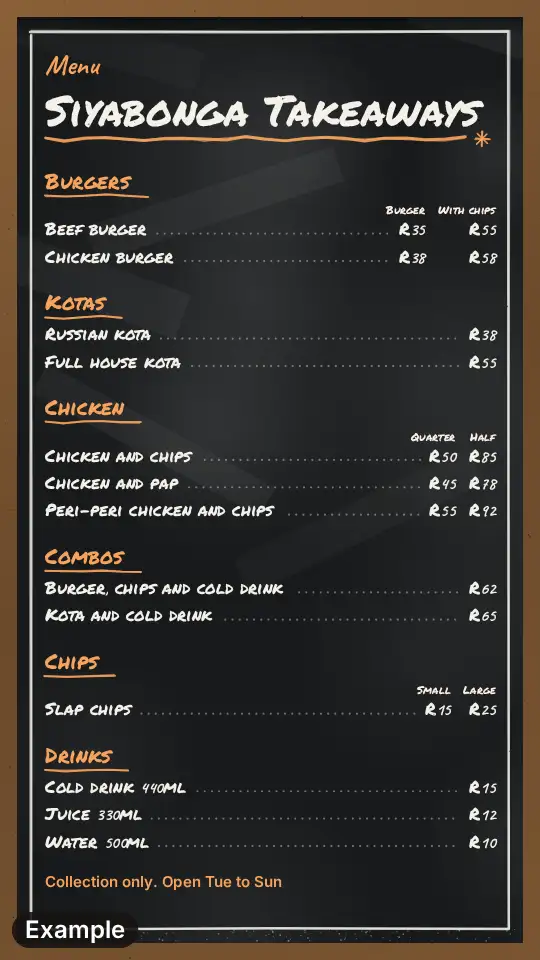 Takeaway menu
Burgers beside kotas, chicken and combos fit the wider takeaway menu, six sections on a chalkboard.
 Grill house menu
Ribs, wings and flame-grilled chicken next to the burgers get a grill house board.
 Pizza menu
A burger and pizza place can run two menus: the pizza one has medium and large columns.
 Food truck menu
Flipping burgers from a hatch? The truck board is shorter, with a strip for where you park.