


What goes on a catering price list
- 1Meals per person
- Put each meal in a section, with its price for one person. A buyer working out a function reads the price per head first.
- 2Platters in two sizes
- Put the platters in a section of their own, with a price for each size on the same line. Under All options, tick "Two prices on each line, like Small and Large" for the platters section, then type the size names in the boxes First price is and Second price is, like "Serves 10" and "Serves 20".
- 3Extras at the foot
- Dessert per person, cold drinks and delivery go in an extras section at the foot. Every extra has a line and a price of its own.
- 4The minimum and the notice
- Say the minimum number of people and how far ahead to order in the line at the foot, such as "Minimum 20 people. Order a week ahead".
- 5Where the list goes
- Put the A4 sheet on the counter and the A5 half sheet where orders are written down. Share the tall picture on WhatsApp Status whenever a price moves.
- 6What a meal includes
- Name what comes with each meal, such as "Lamb curry, rice and sambals", so a buyer can check the order against the guest list.
Catering price list design ideas
Six ways one catering price list can look: a cream card with bottle green capitals, a forest green card, graphite grey with a silver frame, a navy card with a gold lattice, a cream card with a cherry red frame and a purple board with yellow prices. Tap a picture to start from it.
- Cream card with bottle green capitals, A4 to print
- A cream card with bottle green slab capitals. A4 for the counter.
- Forest green card with cream lettering, square
- A forest green card with cream lettering, a calm look for a home kitchen. Square for a post.
- Graphite grey with a silver frame, tall
- Graphite grey with a thin silver frame and silver figures, for a caterer with a classic look. Tall for WhatsApp Status.
- Navy card with a gold lattice, A5
- A navy card with a gold lattice, the look of a printed menu. A5 for the table where orders are taken.
- Cream card with a cherry red frame, tall
- A cream card with a cherry red frame, a plain look for a function caterer. Tall for WhatsApp Status.
- Purple board with yellow prices, tall
- A purple board with yellow prices, a bold look for a kitchen. Tall for WhatsApp Status.
A catering price list, step by step
The list has three sections: meals per person, platters in two sizes, and extras. Type each meal with its price, and each platter with both sizes. The line at the foot gives the minimum and the notice. The extras come last, so the meals and platters lead the list and the add-ons follow them, the way a buyer reads an order.
Tips
- Give the price per person, so a buyer can work out the total.
- Name the size of a platter in the price line, like "Serves 10".
- Put the delivery charge in the extras, so it is not a surprise.
- Use the line at the foot for the minimum and the notice.
- Change a price in the line when it moves, and save a new picture.
Questions
- Can I show a minimum order?
- Yes. Type it in the line at the foot, such as "Minimum 20 people. Order a week ahead". The picture does not check the order.
- Can I add a photo of a platter to the list?
- A picture is optional. Add one from the box under All options, or skip it.
- Do I need a new list when a price moves?
- No. Change only the prices that move, then save a new picture.
- What size does a printed catering list come out at?
- The A4 sheet fills a printer page. The A5 sheet is half of one, which is handy beside the phone where orders come in. Choose either on the Get your picture step.
What you type is kept in this browser on this device until you clear your browser data, so you can come back, change a price and save a new picture. A photo and a logo are optional and are not kept for the next visit.
Sizes, printing and saving
You get a picture to post, and a bigger one to print on a normal printer page (A4) or half a page (A5), not a Word file. Free, no account, and nothing is uploaded: the picture is made on your device.
- Tall, for WhatsApp Status
- Tall like a phone screen. Best for WhatsApp Status and for Stories.
- Square, for a post
- Square. Best for a post on Facebook or Instagram.
- Printer page (A4)
- A4 is the size of a normal printer page. Print it at home or at a print shop. A home printer leaves a thin white edge.
- Half page (A5)
- A5 is half of a normal printer page. Good for a counter. A home printer leaves a thin white edge.
Closest to this one
 Platter price list
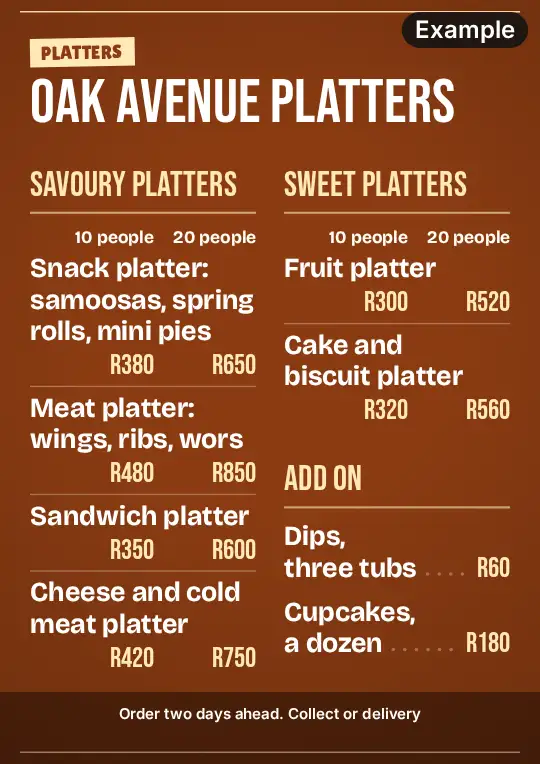
Platters for the same functions, in two sizes, have a platter price list, with the snacks and sweets on it.
 Price list
A home kitchen that also sells shelf items can keep them on a tuck shop price list, beside its meals.
 Cake price list
A caterer who also bakes can give the cakes a price list of their own, beside the meals.
 Dessert menu
Dessert per person for a function, with waffles and sundaes, has a dessert board of its own.