


What goes on a menu board
- 1Two or three sections, no more
- A board is read at a glance, so keep it to two or three headings, such as Mains, Sides and Drinks. Under All options, add each section and then its items below it. A fourth section is better on a second board.
- 2Names short enough to read from the door
- Keep each item name to a few words, so each line stays short, and leave the price in its own box, which is drawn on the right.
- 3A4 or A5, and where it goes
- A4 is the size of a normal printer page and suits a door, a window or a small wall. A5 is half of that and suits a counter. Measure the space before you print.
- 4Times in the note, not a story
- The note under the board is for when you are open or how to order. It takes 60 letters, so keep it to the times and a phone number.
- 5Check the print before it goes up
- Print one copy and look at it from the distance a customer stands. If a price is hard to read from there, shorten the name beside it and print again.
Menu board design ideas
Six menu boards from the pictures above: a dark red card with gold, a slate card with silver, a red stripes board, a red braai board, a cream card with a charcoal frame and a green braai board. Tap one to start from it, then type your items over the example.
- Dark and serif look in burgundy, A5
- Very dark red with a gold frame and serif lettering. A5 suits a counter, where a diner reads the board from a step away.
- Dark card with silver figures, A4 to print
- Slate with silver figures, a quiet board for a wall. A4 is the size of a normal printer page.
- Stripes look in chilli red, A4
- Stripes in chilli red is the boldest of the boards. The bands and tabs make each section easy to find from the door.
- Braai look in red, A5 for the counter
- The Braai look in red, with a checker edge and yellow section labels. On A5 it fits the counter.
- Sunday lunch card with a charcoal frame, A4
- A cream card with a charcoal frame and serif names. It is the calmest board here, and it prints well on A4.
- Braai look in green, A5 for the counter
- The Braai look in green, for a counter that sells braai food. The same labels, in the colour of a leafy wall.
A menu board, step by step
The example has three sections: Mains with three dishes, Sides with two and Drinks with three. Type each section name under All options, then each item with its price. The first picture is the example in the Dark and serif look, A5 for the counter.
Tips
- Use a few words for each name, so the price is seen first.
- Two or three sections is enough. Take out any section that is not on today.
- Keep every price in its own box, in the same format.
- Put the opening times in the note at the foot.
- Print one copy and check it at a step back before you put it up.
Sizes and printing
- Tall, for WhatsApp Status
- Tall like a phone screen. Best for WhatsApp Status and for Stories.
- Square, for a post
- Square. Best for a post on Facebook or Instagram.
- Printer page (A4)
- A4 is the size of a normal printer page. Print it at home or at a print shop. A home printer leaves a thin white edge.
- Half page (A5)
- A5 is half of a normal printer page. Good for a counter. A home printer leaves a thin white edge.
Questions
- Is A4 or A5 the right size for my board?
- A4 is the size of a normal printer page and suits a door, a window or a small wall. A5 is half of that and suits a counter. The print options are in the Get your picture step.
What you type is kept in this browser on this device until you clear your browser data, so you can come back, change a price and save a new picture. A photo and a logo are optional and are not kept for the next visit.
Closest to this one
 Restaurant menu
A full list of starters, mains and desserts needs a restaurant menu, with a section for each.
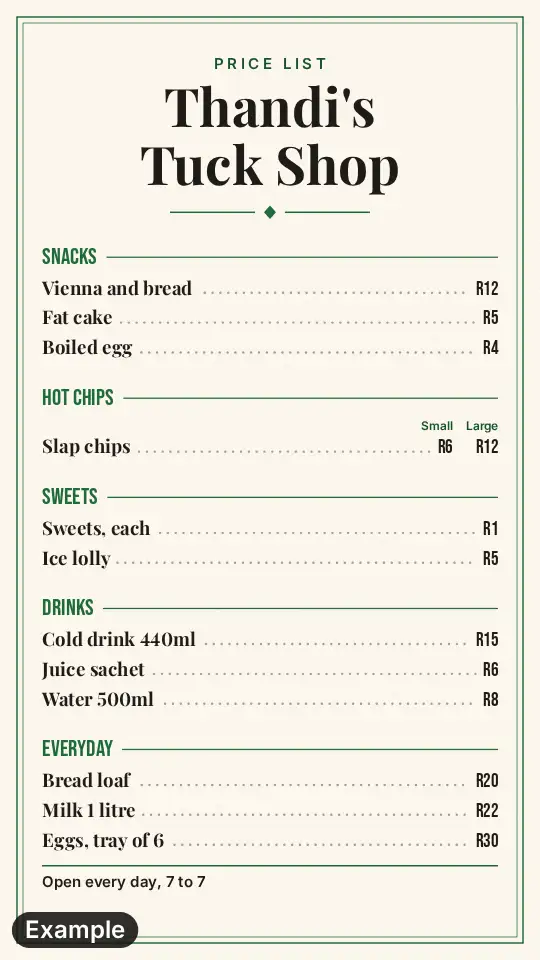 Price list
A long list of items under headings, for a shop rather than a board, goes on the price list.
 Food truck menu
A truck has one board for the hatch, and its menu sets out the sections for the window.
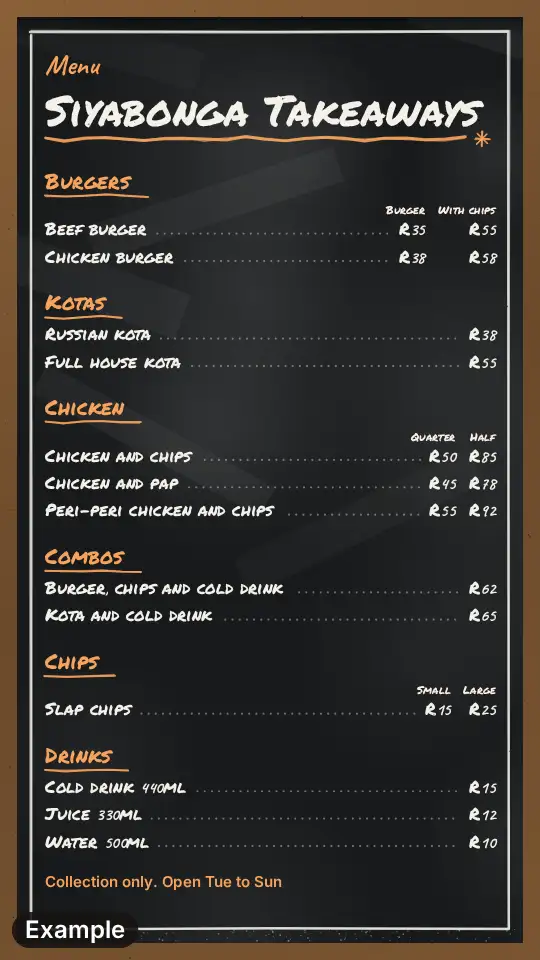 Takeaway menu
The same items as a tall picture for Status and as a board for the counter: one menu, two sizes.